

Forex data in Google Sheets, in minutes
Our currency data API puts live and historical exchange rates into your Google Sheets without any programming. Four steps and you're requesting data.
Getting started
Use Google Sheets in four simple steps
We believe in giving everyone access to data. That's why our data is available in Google Sheets in four easy steps. Prefer a walkthrough? Read the Google Sheets tutorial.
-
1
Sign up for the API
Create your account. The free plan includes 1,000 requests a month.
Sign up -
2
Get your API key
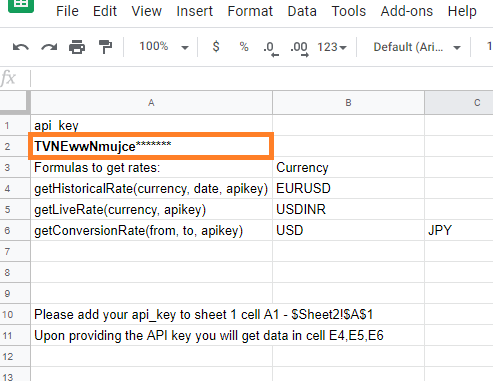
Your key is on your account page as soon as you've signed in.
Get API key -
3
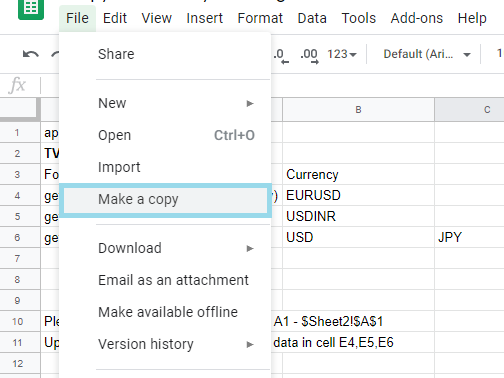
Copy the spreadsheet
Make your own copy of our template sheet in Google Drive.
Copy spreadsheet -
4
Start requesting data
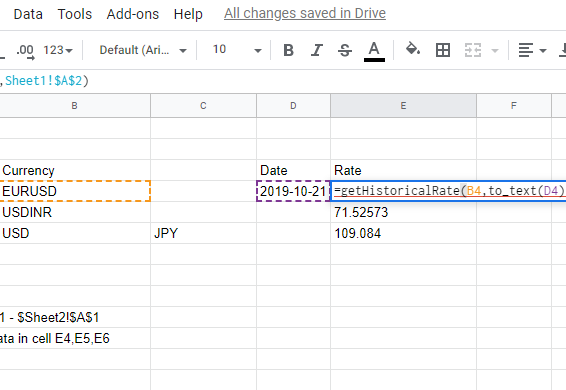
Paste in your key, change the symbols and dates, and run the request.
How to run a request
Run a spreadsheet request
Spreadsheet features
Simple setup. No programming is required to bring our data into Google Sheets.
- Live prices
- Historical data from 1990
- Easy setup
- Start in minutes
- Clean data
- Over 40 currencies plus gold and silver
Frequently asked questions
-
Yes, and you also get forex data with 1,000 requests a month for free.
-
Live and historical data arrive in the spreadsheet in seconds.
-
Over 1,700 currency pairs plus gold and silver. See the live currencies list.
-
Yes. We provide up to 1,000 requests a month on an ongoing basis.