

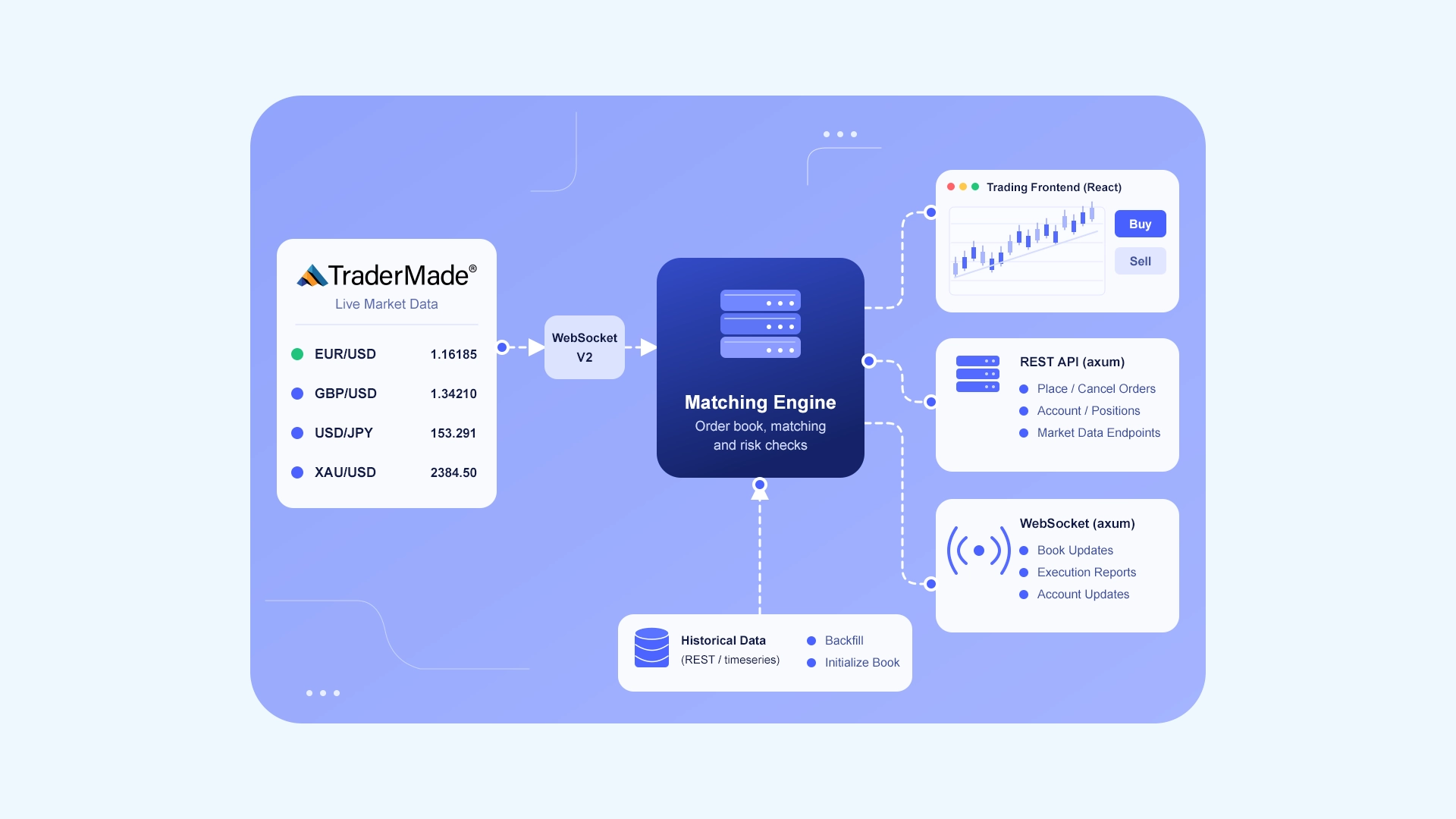
Many of the organisations that use TraderMade data are building platforms that fill orders. Prop firm challenge accounts, broker demo environments and paper trading applications all need the same thing, a way to turn a live price into a credible fill. To understand what that takes in practice, we built a matching engine on our own live WebSocket feed and let Claude Code write much of the code.
Coding the core order book required a day; implementing realistic fill logic took an additional day and a half. This tutorial has two parts: first, you can run our engine as it stands. Second, and more important, you can learn what to expect if you build your own with Claude or another AI assistant. An AI can write standard matching code effortlessly, but it lacks the domain context that comes from 20 years in market data, engineers with an average of 20 years' experience, and supporting hundreds of active brokers, prop firms, and trading platforms. We built this engine with AI, honing our prompts along the way, to show you where raw AI code breaks on live prices and how to handle those edge cases cleanly.
Running our matching engine
You can find the complete source code in our GitHub repository for matching-engine.
To run it locally, you will need Rust 1.75 or later, Node.js 20 or later, and a TraderMade streaming API key (which you can obtain by signing up here). Clone the project, add your key, and start the server:
git clone https://github.com/tradermade/marketdata-matching-engine.git
cd marketdata-matching-engine
cp .env.example .env          # add your TRADERMADE_WS_API_KEY
cd web && npm install && npm run build && cd ..
cargo run --release -p tm-server
You should see the following output:
INFO tm_server: listening on http://127.0.0.1:8080 (feed: TraderMade WebSocket V2)
INFO tm_server::feed: TraderMade login ok
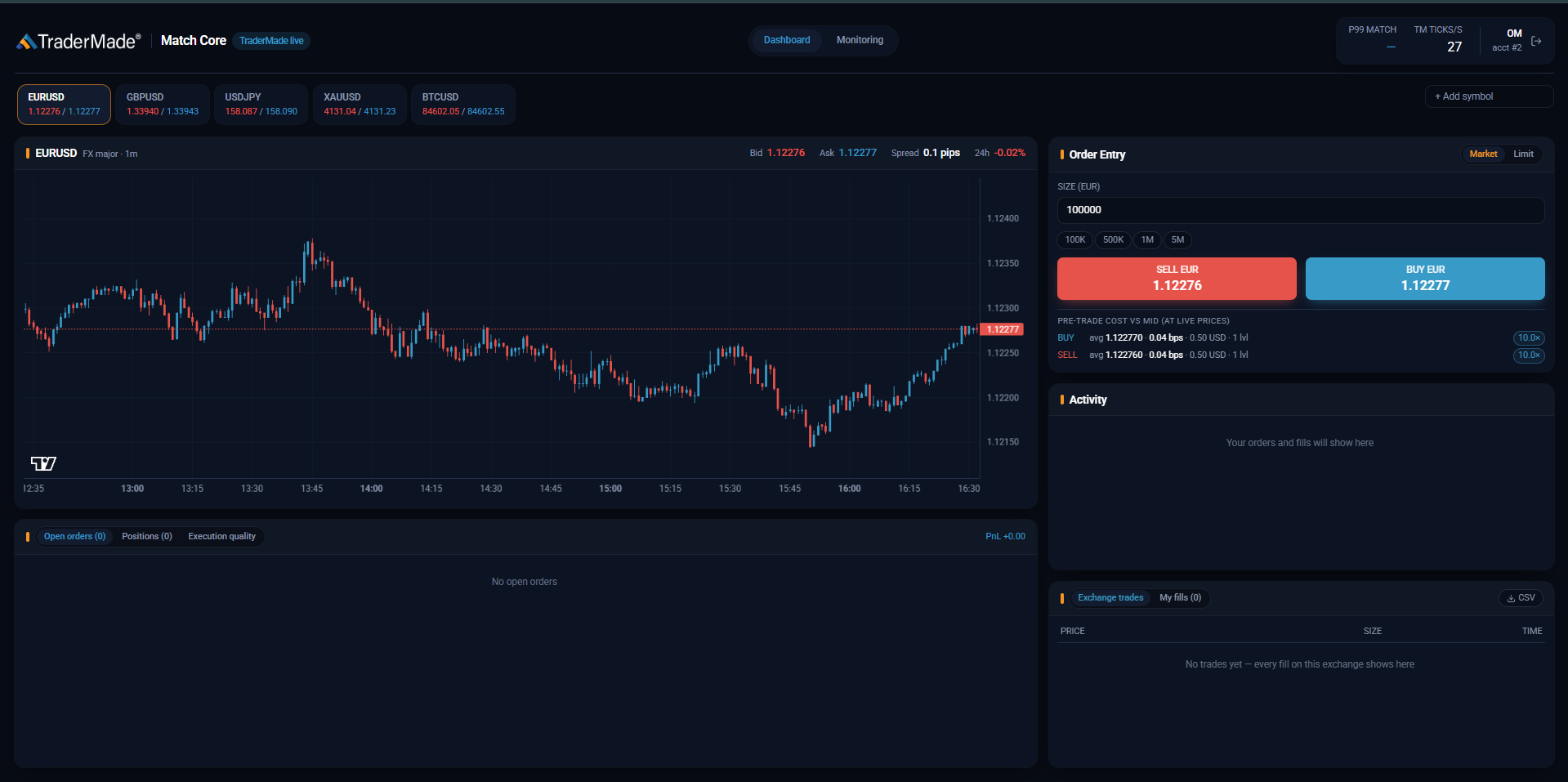
Open http://127.0.0.1:8080, enter any name and place a market order to buy 1M EURUSD. In our test the order filled at 1.12168, priced directly from the live feed.
The engine supports limit, market, immediate-or-cancel, fill-or-kill and post-only orders, together with modify and cancel. Orders are matched against TraderMade’s screened best bid and ask, using the size quoted at each price. For each order, the engine reports its position in the queue, the expected cost before you submit it, and how the price moved after the fill. The default symbol list is EURUSD, GBPUSD, USDJPY, XAUUSD and BTCUSD. To add other FX pairs, crypto or CFDs, edit crates/server/src/config.rs.
Building your own with Claude
Asking an AI to write a price-time priority order book is the easy part. It’ll generate standard order types and partial fill logic without any issues. What it won't tell you, though, is what actually happens when that code connects to a live market data feed. Everything below comes from what we learned during our build, covering the practical mechanics you need to feed your AI before connecting to real market data.
Defining your requirements
Before writing your first prompt, figure out who will use the engine and what matters most. That decision drives your architecture and stack. If ultra-low latency is critical, stick with Rust or C++. For handling high volume, Rust, C++, and Java are all solid choices. High availability comes down to system design, such as running a secondary standby engine on the same feed, rather than language choice. And if you want to build a quick prototype, Python or TypeScript is a great fit.
You also need to check your market data beforehand. The matching logic your AI writes depends entirely on what data actually comes through, so confirm your feed structure first.
Managing the WebSocket connection
AI coding assistants frequently pull from outdated library versions. In Rust, for instance, tokio-tungstenite changed its message types in 0.24 and added TLS setup steps in 0.26. Always pin your exact library versions directly in your prompt to avoid chasing syntax errors from day one.
Catch Silent Cloud Disconnects
Take cloud infrastructure, for example. If you deploy your engine on AWS, Azure, or GCP, cloud NAT gateways will automatically drop idle TCP connections when traffic pauses. On AWS, that NAT timeout hits after 350 seconds. If an FX or CFD market is closed over the weekend, or a symbol goes quiet, your application socket will still report an OPEN state locally, even though the underlying network link died hours ago. Crypto trades through the weekend, so a silent crypto symbol is far more likely to be a dead connection than a closed market. To handle this without crashing your engine, set up your connection loop to send a WebSocket ping every 20 seconds. If neither a new tick nor a pong comes back within your timeout window, force a clean reconnect.
Track Activity Against Market Hours You also need to account for how individual symbols move during different trading sessions. A quiet FX pair during Asian trading hours is not broken. It is just low volume. Index CFDs go silent outside their exchange hours. Crypto has no scheduled lull at all. Check each symbol's update pace against its actual trading hours so your application doesn't confuse a scheduled market lull with a dead connection.
Handle Post-Reconnect Gaps Safely When a reconnect does happen, don't treat the next incoming price as a massive market move. Streaming WebSockets are designed to deliver real-time quotes, not replay historical ticks you missed while offline. If your engine blindly compares the last price before the drop to the first price after reconnecting, that sudden jump can accidentally trigger stop orders, alert triggers, or candle calculations. Mark the first post-reconnect tick as a fresh starting baseline, and use TraderMade’s REST API to backfill any missing price history.
Isolate Network Logic from the UI Keep your WebSocket client completely separate from your frontend rendering. If you're building a web interface, run the socket inside a dedicated Web Worker. That way, if a browser tab lags or spends time rendering heavy charts, it won't stall incoming price processing.
Buffer Management and Clocks
- Overwrite old ticks instead of queueing them: In high-volatility news bursts, queueing every tick causes your engine to match orders against outdated prices. Maintain a single slot per symbol and overwrite it with the newest price, tracking running high/low values separately to keep candle charts accurate.
- Rely on monotonic timers: Never use system wall-clock time (
Date.now()in JavaScript orSystemTime::now()in Rust) for timeouts or latency checks, as periodic NTP clock syncs can cause jumps backward or forward. Use monotonic timers (performance.now()orstd::time::Instant), that only move forward.
Building the order book from live prices
TraderMade's feed publishes screened top-of-book prices (best bid and ask) with the available size at each price. Treat these published prices as your authoritative top-of-book. They are pre-filtered to strip out locked or crossed quotes before broadcast.
If your simulated trading UI requires estimated liquidity beyond the top level, make sure your models explicitly tag any generated quotes as synthetic so your execution engine never treats them as real market depth.
Floating-Point Precision and Asset Units
Never store prices or order quantities as standard floating-point numbers (f32/f64 or JavaScript Number). Binary floating-point math introduces rounding drift that breaks exact order matching and price equality checks. For example, averaging 1.12071 and 1.12072 produces 1.1207150000000001.
Instead, convert prices to integer ticks based on each instrument's price precision. Read the precision from the feed per symbol rather than assuming it by asset class; the common cases are:
- 5 decimals (100,000 multiplier): Standard FX pairs like EURUSD
- 3 decimals (1,000 multiplier): JPY currency pairs like USDJPY
- 2 decimals (100 multiplier): Gold (XAUUSD) and major crypto like BTCUSD
- 1 decimal (10 multiplier): Index CFDs like UK100
Smaller crypto pairs can quote to four decimals or more, so a hard-coded table will eventually be wrong for one of them.
Keeping fills fair
Simulating liquidity on a live price feed usually means running a dedicated market maker account that quotes resting orders into the book. How you update those market maker quotes directly affects execution fairness for user orders.
Market Maker Quote Maintenance Canceling and replacing quotes on every price tick is a common mistake. It resets queue priority constantly, pushing market makers to the back and letting client orders unfairly jump the line. Instead:
- Modify in place: Only update resting quotes whose price or size has actually changed.
- Maintain queue priority: Keep an order's spot in line when size decreases, but reset its priority to the back if size increases or price changes.
- Prevent wash trading: Enforce strict Self-Trade Prevention (STP) at the engine level so no account can cross or match against its own resting quotes.
Realistic Fill Execution and Queue Position Be strict about when a resting limit order actually fills. A fill should only occur when genuine market movement drives the opposite side of the book through your order level and all prior liquidity queued ahead of that order has been fully cleared.
Filling an order the instant a price chart "touches" the limit price creates unrealistic fills that wouldn't happen in a real market. In real trading, resting orders naturally experience adverse selection. By the time a resting order fills, the market has often already moved past that price level. An engine that ignores queue position hides this behavior, giving traders artificial fills and skewed performance testing.
Enforcing Strict Execution Rules
- Queue priority rules: Reducing an existing order's size must preserve its position in the queue. However, increasing an order's quantity or modifying its price must automatically reset its time priority to the back of the line, preventing participants from queuing small placeholder orders and inflating them later.
- Fill-or-Kill (FOK) pre-checks: FOK orders must perform an atomic pre-check against available order book liquidity before attempting execution. If total liquidity is insufficient, reject the order entirely. Never attempt a partial fill.
- Idempotency keys: Require a unique client_order_id on every payload to block duplicate submissions caused by network retries before they reach the matching loop.
- Slippage and partial fill policies: If an incoming market or IOC order quantity exceeds the available top-of-book size, fill what is available at the quoted price and handle the remainder immediately according to your rule: either canceling the unmatched balance or resting it as a limit order.
Decisions to settle before traders disagree
Edge cases in execution are where trader disputes actually happen, so explicitly define how your engine handles these critical scenarios before prompting your AI, or it will quietly make those decisions for you.
Stop Orders and Market Gaps If an FX or CFD market gaps past a stop price over the weekend, fill the order at the first available open price and explicitly state that stop prices aren't guaranteed. Crypto does not close, so weekend gaps do not apply, but thin overnight liquidity can produce the same jump. During the FX daily rollover (~5 PM NY time), decide whether stop orders should pause to prevent accidental fills caused by temporary spread widening.
Session Schedules and Timezones Account for Daylight Saving Time shifts (5 PM NY close moves between 21:00 and 22:00 UTC) so daily candles, expirations, and drawdowns don't drift for half the year. Additionally, configure symbol-specific schedules so matching automatically pauses during market breaks, like gold's daily halt or an index CFD's exchange hours. Crypto symbols trade continuously and need no schedule, which means they also never get the natural reset a daily close provides.
In-Flight Order Operations
Follow the FIX protocol for size modifications. If a 1M order has 600K filled and the user changes quantity to 500K, treat 500K as the total intended size and mark it fully filled. Define explicit rules for overnight swaps and margin liquidations (like closing the largest losing positions first). Finally, return already_filled instead of a generic error if a cancellation arrives right after a fill, using client_order_id to sync state cleanly.
Handling feed interruptions and market closures
The most critical rule for a matching engine on a live feed is simple: if live price updates stop, matching must stop immediately. Never allow your engine to fall back to simulated pricing or execute against stale quotes.
- Enforce symbol warm-up: On engine startup or after a reconnection, keep order matching paused until fresh top-of-book data arrives for that symbol. (When subscribing to TraderMade's WebSocket V2, pass
send_last: trueto get immediate baseline quotes). - State persistence and snapshots: Write order events to an append-only WAL or take periodic snapshots so open orders survive restarts.
- UI broadcast strategies: Push a full top-of-book snapshot every 100ms instead of raw diffs to prevent browser clients from desynchronizing if a frame drops.
Demonstrating that every fill was fair
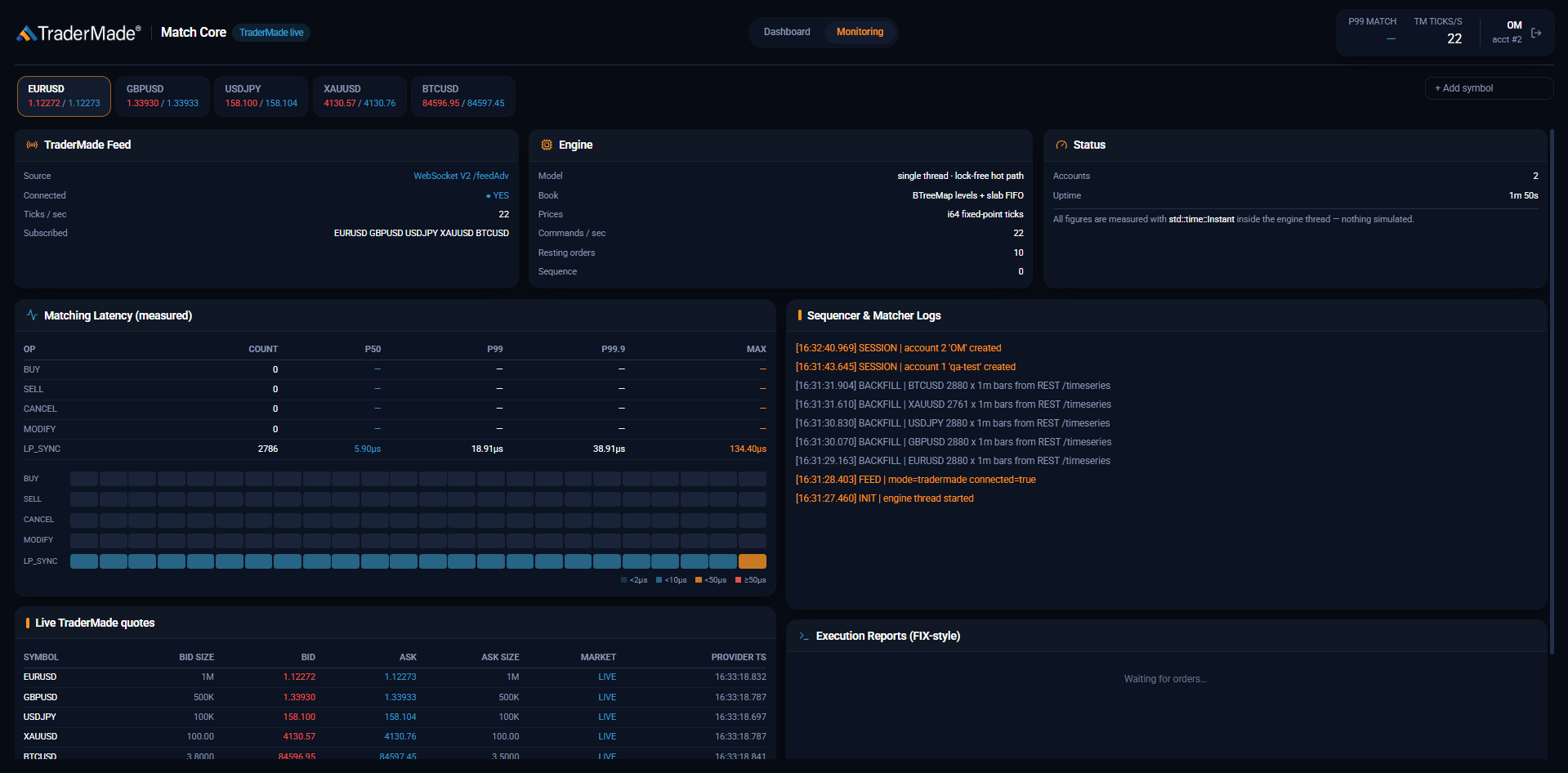
Execution disputes are inevitable, so you need an immutable audit path. Run matching on a single thread per symbol and log every message sequentially so you can replay real market feeds to reproduce edge-case bugs deterministically. For every fill, record the queue position, arrival mid-price, and post-trade markouts (at 1s, 5s, and 60s) to prove whether a fill was fair or just subject to normal market movement. Finally, enforce explicit Self-Trade Prevention (STP) rules, and benchmark thread latency under realistic idle states, where CPU power-saving wake-ups can turn a 3-microsecond loop into a 25-microsecond delay.
Note: While our open-source matching engine models realistic execution mechanics, it is designed for demo, sandbox, and backtesting purposes. Users must thoroughly audit risk management parameters, order routing, and regulatory compliance before deploying any matching infrastructure in production or capital-bearing environments.
Ensuring your AI asks before it assumes
Most of our wasted time came from the AI quietly guessing market rules instead of asking. Tell your assistant to flag these decisions first. Using a second AI prompt acting as a skeptical reviewer also helps catch bad execution logic before it hits your codebase.
A starter prompt to build your matching engine on real-time market data over WebSocket
You are building a matching engine fed by TraderMade's live WebSocket prices.
Before writing any code, ask me:
- who will use it, and what matters most: latency, scale, uptime or speed of delivery
- what my data includes (best price, sizes, depth) and for which symbols
- what happens to an order bigger than the visible book
- what happens when prices stop, a market closes or the feed reconnects
- how stops trigger, how positions are valued and what records to keep
Do not decide these yourself. If unsure, ask.

Connection
- Pin library versions (I will give them). Subscribe after login_ok with
  send_last: true, and again after every reconnect.
- Ping every 20 seconds; if no price or pong arrives in time, reconnect cleanly.
- Treat the first price after a reconnect as a new baseline; backfill gaps via REST.
- Keep API keys on the server. Throttle what goes to the screen, never engine input.
- Use monotonic clocks (std::time::Instant) for timeouts and latency.

Order book
- The book is TraderMade's published best bid and ask, with the size quoted
  at each.
- Prices and quantities are integer ticks per instrument. No floats in matching
  or accounting.

Fills
- Update only market maker quotes that changed; cancel stale ones first.
  Block self-trades.
- Fill resting orders only when the opposite side reaches their price, after
  the orders ahead of them in the queue.
- Size cuts keep queue priority; size increases and price changes lose it.
  Fill-or-kill checks liquidity before matching.
- Require a client_order_id and reject duplicates. Show expected cost and book
  coverage before accepting an order.
- Buy stops trigger on the ask, sell stops on the bid. Gaps fill at the first
  available price.

Time and failures
- Follow each symbol's trading hours: the 5pm New York day end for FX (21:00 or
  22:00 UTC with daylight saving), gold's daily break, each index CFD's exchange
  hours. Crypto trades 24/7 and has no close.
- If live prices stop, stop matching that symbol and say so on screen.
  Never fall back to simulated prices.
- After startup or a reconnect, wait for a fresh price before matching.

Proof
- One matching thread per symbol, every input logged in order, replayable.
- For each fill, store queue position, arrival mid and 1s/5s/60s markouts.
- Tests replay recorded feed data.
Next steps
To learn how TraderMade's published price is screened, read what Tier 1 means. For a detailed walkthrough of the connection code, see our Rust WebSocket client tutorial.