

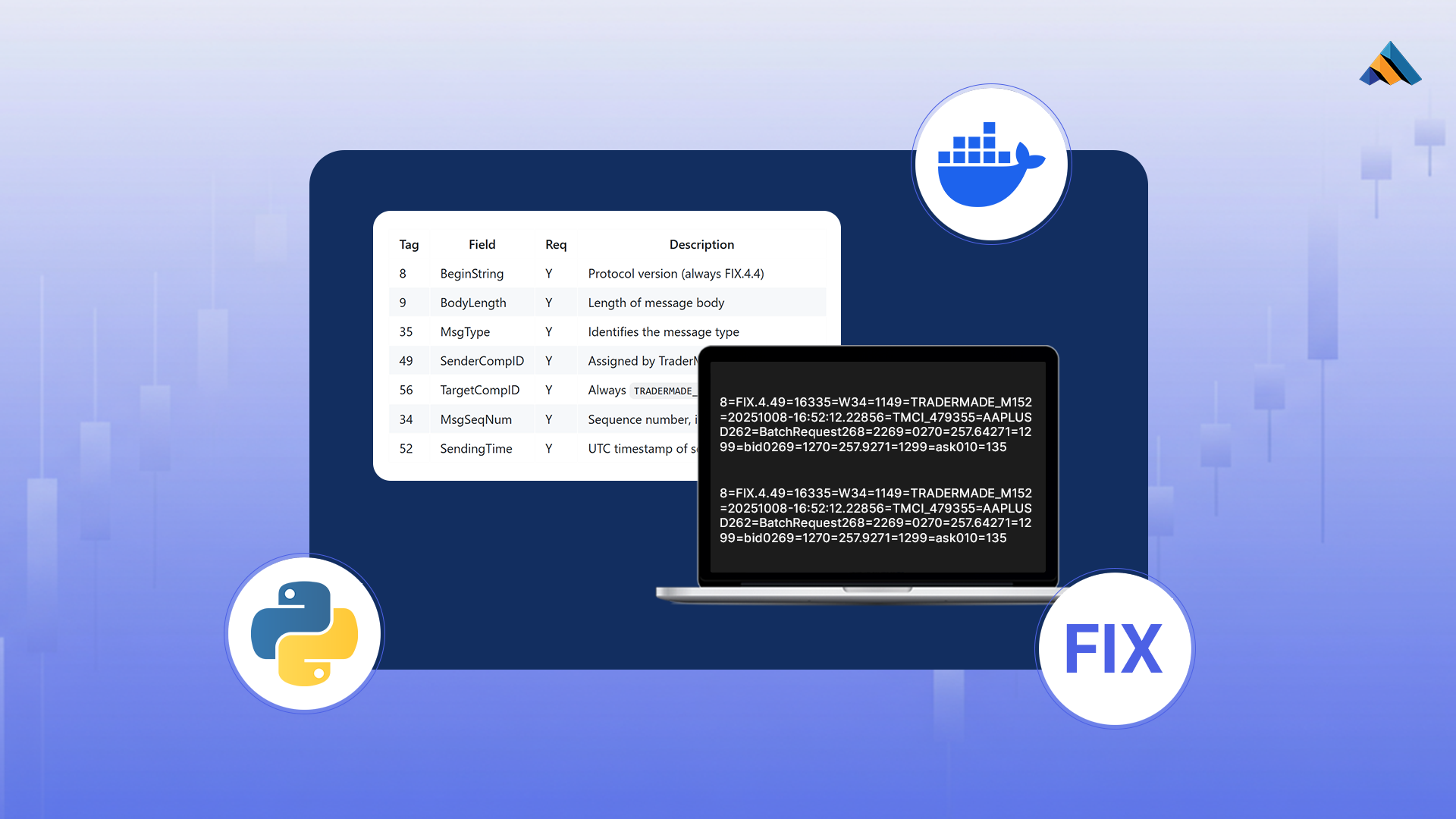
The Financial Information eXchange (FIX) Protocol is the industry-standard messaging layer for electronic trading, enabling real-time communication between trading systems. This guide demonstrates how to set up your first FIX client using Docker to connect to TraderMade's FIX server, streamlining the path from development to production-ready market data integration.
What You'll Build
By the end of this tutorial, you'll have a containerized Python FIX client capable of: - Establishing authenticated connections to institutional trading infrastructure - Receiving real-time market data feeds - Processing FIX protocol messages in a reproducible Docker environment
Prerequisites
1. Get Your FIX Credentials
To connect to the TraderMade FIX server, you need authentication credentials:
- Request Access: Visit TraderMade FIX API and request a FIX Trial account
- Download Configuration: After approval, log into your TraderMade Dashboard and download your connection config file
- Environment Setup: Amend sample .env file and rename to
envwith your credentials and make sure its in your project root directory.
You should add your credentials to the below listed variables in your .env file. (example):
FILESTOREPATH=store/TMCI_XXXX/
USERNAME=TUSR_XXXX
PASSWORD=XXXXXXXXX
SENDER_COMP_ID=TMCI_XXXX
SYMBOLS=EURUSD,GBPUSD
Replace symbols to get the instrument you want to request data for.
2. Required Software
Ensure you have installed: - Docker Desktop (or Docker Engine + Docker Compose) - Python 3.8 or higher - Git (to clone the repository)
Architecture Overview
This setup uses a three-layer architecture:
- Docker Compose Manager (
dockerComposeManager.py): Orchestrates configuration generation and container lifecycle - Docker Container: Provides an isolated, reproducible runtime environment
- FIX Client (
fix_client.py): The Python application handling FIX protocol communication
Step-by-Step Implementation
Step 1: Set Up Your Project
Clone the repository and navigate to the project directory:
git clone https://github.com/tradermade/python-FIX-Demo-Client.git
cd python-FIX-Demo-Client
Ensure your .env file is properly configured in the root directory.
Step 2: Launch the Docker Compose Manager
The dockerComposeManager.py script provides an interactive menu system for managing your FIX client deployment.
Start the manager:
python dockerComposeManager.py
You'll see the main menu:
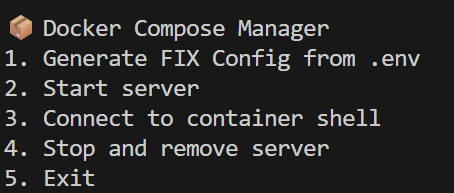
Step 3: Generate Client Configuration
The FIX protocol requires precise configuration matching between client and server. Generate your client config file:
Action: Press 1 to generate the configuration
The script will:
- Read credentials from your .env file
- Generate a QuickFIX-compliant configuration file
- Place the config in the src/ directory where the client expects it
Important: This step must complete successfully before proceeding. Verify that src/client.cfg (or equivalent) has been created.
Step 4: Build and Launch the Docker Container
Now containerize and start your FIX client application:
Action: Press 2 to build and start the server
This command executes:
docker-compose up --build -d
Docker will: - Build the Python environment with required dependencies (QuickFIX, etc.) - Create an isolated container - Mount your source code - Start the container in detached mode
Wait for the build process to complete. You can verify the container is running:
docker ps
Step 5: Start the FIX Client
To interact with your FIX client, access the running container's shell:
Action: Press 3 to access the container shell
This opens an interactive bash session inside the container, typically at the root directory (/).
Now you're inside the container and ready to launch the client application.
Navigate to the source directory:
cd /src
Execute the FIX client:
python fix_client.py
Success! Your FIX client will: 1. Connect to the TraderMade FIX server 2. Perform the logon sequence 3. Begin receiving and processing market data messages
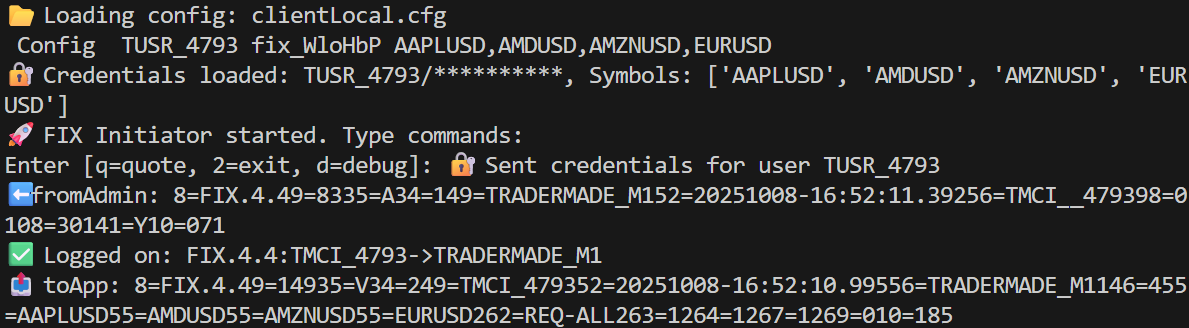
Understanding FIX Messages
Once connected, you'll observe FIX messages in your terminal. Every message follows this structure:
Standard Header (required in all messages):
- BeginString (8): Protocol version - always
FIX.4.4 - MsgType (35): Message type identifier
- SenderCompID (49): Your assigned client
- TargetCompID (56): Always
TRADERMADE_M1for this server - MsgSeqNum (34): Incrementing sequence number per session
Standard Trailer:
- CheckSum (10): 3-digit message integrity check
Key Message Types You'll See
Session Messages (manage the connection):
-
Logon (35=A): Initial authentication with username (553) and password (554)
-
Heartbeat (35=0): Keep-alive sent every 30 seconds
-
Logout (35=5): Clean session termination
Market Data Messages:
-
Market Data Request (35=V): Subscribe to symbols (e.g., GBPUSD)
- Specify MDReqID (262), symbols (55), and entry types (269: 0=Bid, 1=Offer)
-
Market Data Snapshot (35=W): Current prices delivered by server
- Contains symbol (55), bid/offer prices (270), and sizes (271)
-
Market Data Request Reject (35=Y): Subscription failed (e.g., unknown symbol)
Example Message Flow
Client → Server: Logon (35=A) with credentials
Server → Client: Logon (35=A) confirming connection
Client → Server: Market Data Request (35=V) for GBPUSD
Server → Client: Market Data Snapshot (35=W) with bid=1.2995, offer=1.2997
Both exchange:   Heartbeats (35=0) every 30 seconds
Fields are separated by | (representing SOH character). Example snapshot:
8=FIX.4.4|35=W|55=GBPUSD|268=2|269=0|270=1.2995|271=1000000|269=1|270=1.2997|271=1000000|10=128|
This shows GBPUSD quoted at 1.2995 bid / 1.2997 offer with 1M liquidity on each side.
Troubleshooting Common Issues
Connection Refused
- Verify your credentials in the
.envfile - Check that your IP address is whitelisted (contact TraderMade support)
- Ensure the FIX server endpoint is accessible from your network
Config Not Found
- Confirm Step 3 completed successfully
- Check that
src/client.cfgexists - Verify file permissions inside the container
Docker Build Fails
- Ensure Docker has sufficient resources allocated
- Check your internet connection (dependencies must download)
- Review the Dockerfile for compatibility with your OS
Next Steps
Now that your FIX client is operational, consider:
- Implement Message Handlers: Customize processing logic for different FIX message types
- Add Persistence: Store market data in a database for analysis
- Production Hardening: Add error handling, logging, and automatic reconnection
- Scale Horizontally: Deploy multiple containers for different instruments or markets
Resources
- Full Source Code: GitHub Repository
- FIX Protocol Specification: FIX Trading Community
- QuickFIX Documentation: QuickFIX Python
- TraderMade Support: Contact via your dashboard for technical assistance
Conclusion
You've successfully deployed a containerized FIX client capable of institutional-grade market data integration. Docker provides the reproducibility and isolation needed for reliable trading infrastructure, while the FIX Protocol ensures compatibility with the electronic trading ecosystem.
The combination of Docker's portability and FIX's universality creates a foundation for building sophisticated trading applications that can scale from development through production environments.