

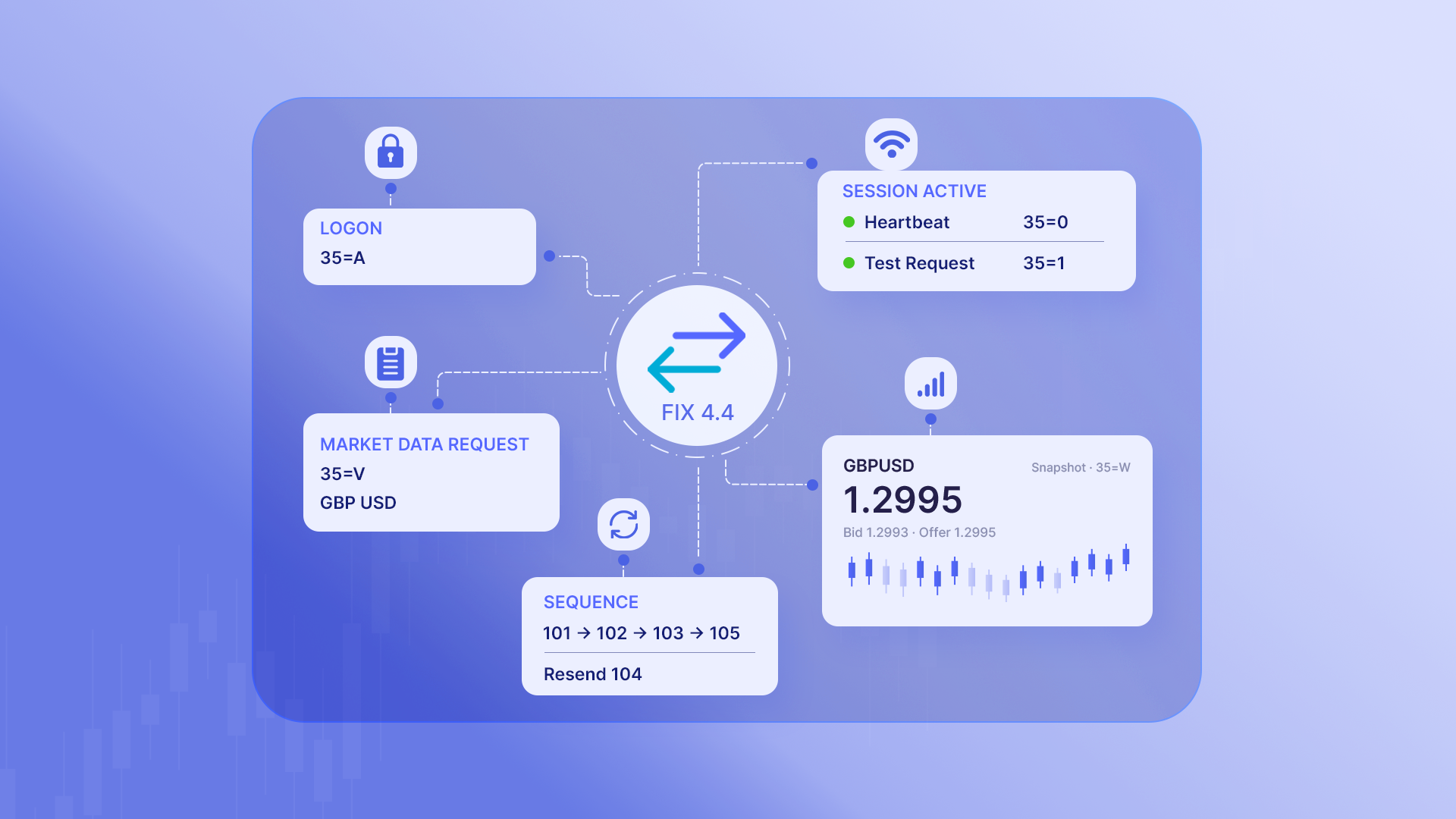
If you're entirely new to FIX, taking a look at a FIX message for the very first time can feel a bit overwhelming.
You'll typically see something like this:
8=FIX.4.4|35=W|34=24|55=GBPUSD|269=0|270=1.2995|269=1|270=1.2997
At first glance, it looks like nothing more than a long, impenetrable string of numbers and values.
However, FIX becomes significantly easier to wrap your head around once you understand what those numbers actually represent—and, more importantly, how a FIX session operates.
In this guide, we'll keep the overly dense technical jargon to a minimum and focus on the fundamental concepts you need to parse FIX market data.
What is FIX Protocol?
FIX stands for Financial Information eXchange.
In plain English, FIX is simply a standard set of rules that lets different financial systems talk to one another seamlessly.
A bank, broker, exchange, trading platform, and market data provider might all run completely different internal setups. FIX provides a universal message format that every system can read and understand when exchanging information.
The protocol covers a massive range of financial workflows, including order routing, trade execution, and market data delivery.
It's worth bearing in mind that using FIX doesn't automatically mean you're placing live trades. You can easily build a FIX connection purely to consume market data.
For example, TraderMade's FIX 4.4 service is designed specifically to subscribe to and stream market data—it doesn't handle order placement at all.
Before we break down the structure of a message, let's take a look at how the connection itself functions.
Why Prop Firms & Institutions Choose FIX Over REST/WebSockets
- Sub-Millisecond Latency: Streaming lightweight tag-value pairs over persistent TCP connections cuts out the heavy payload overhead and JSON parsing bottlenecks you get with WebSockets or REST.
- Deterministic Failover: Built-in sequence tracking (Tag 34) ensures zero silent data loss, letting your system automatically request missing messages after network drops or packet loss.
- Universal Native Support: Plugs straight into institutional liquidity providers, prime brokers, trading engines (like MT5 bridges), and custom C++/Rust backtesting rigs without needing clunky translators.
How Does a FIX Connection Work?
A FIX connection is formally known as a session.
There are always two sides to any session:
- The Initiator: The system that starts up the connection.
- The Acceptor: The system that receives and approves the connection.
If you're connecting your own application to TraderMade, your FIX client acts as the Initiator, whilst the TraderMade server acts as the Acceptor.
The overall connection lifecycle looks like this:
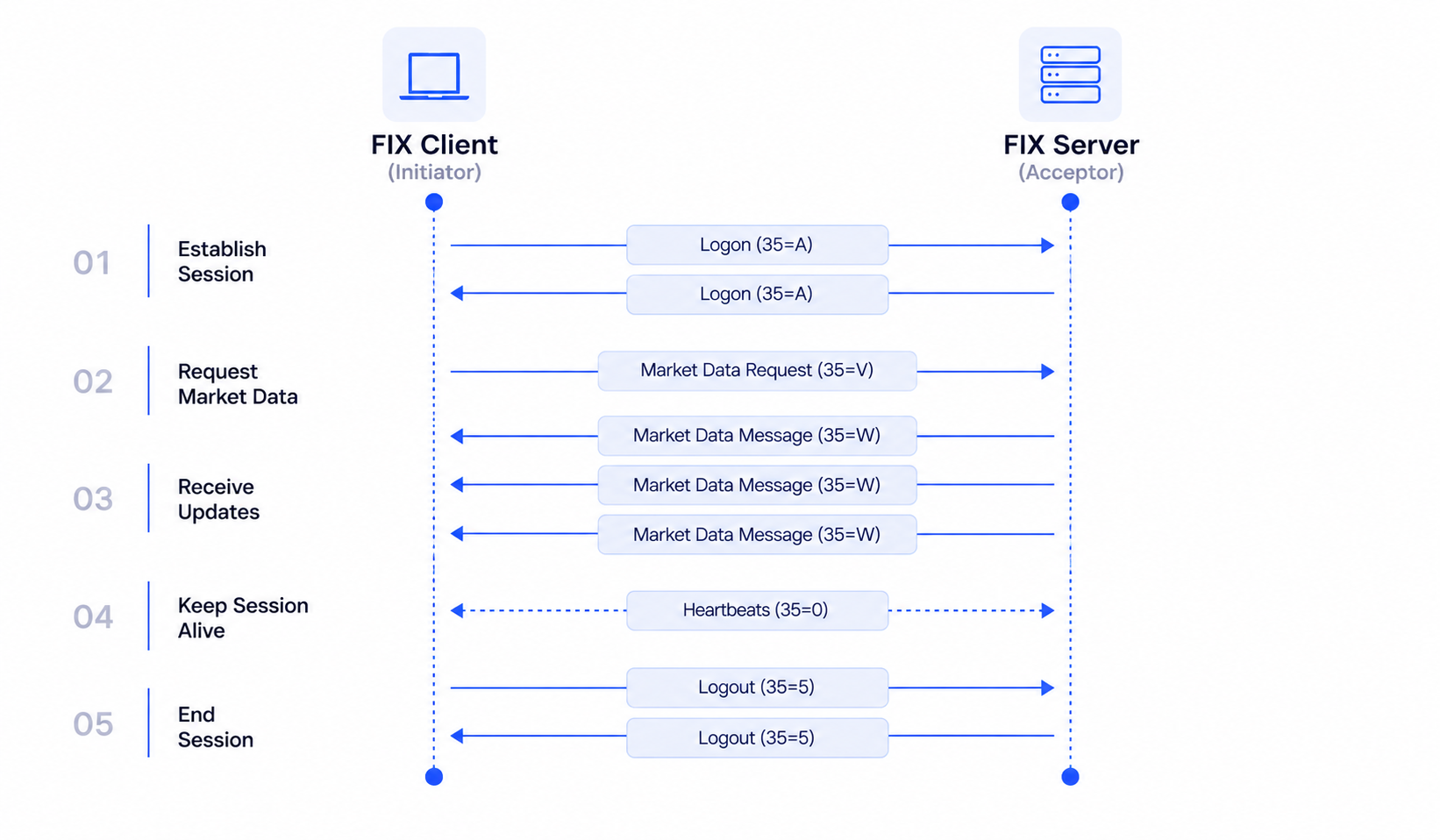
Your client starts by establishing the underlying FIX session.
Once that session is active, it fires off a request for market data. The server then streams continuous price updates back to your application as long as the session remains open.
Behind the scenes, FIX is simultaneously managing background tasks like heartbeats and message sequence numbers.
This distinction is key: there's the market data your application cares about, and then there are the session management messages keeping the connection alive and reliable.
What Does a FIX Message Look Like?
Every FIX message is composed of simple tag=value pairs separated by a delimiter.
Let's re-examine that simplified message from earlier:
8=FIX.4.4|35=W|34=24|55=GBPUSD|269=0|270=1.2995|269=1|270=1.2997
Each integer corresponds to a specific FIX tag with a defined meaning:
8=FIX.4.4— Tag8specifies the FIX protocol version being used.35=W— Tag35identifies the message type.Wtells us this is a Market Data Snapshot Full Refresh.34=24— Tag34is the sequence number. This happens to be message number 24 in the current session.55=GBPUSD— Tag55specifies the currency pair or ticker symbol.
Next up, we hit the actual pricing payload:
269=0|270=1.2995—269=0flags that this entry is a Bid, and270provides the Bid price (1.2995).269=1|270=1.2997—269=1flags that this entry is an Offer (or Ask), and270gives us the Offer price (1.2997).
So that messy string of text simply translates to:
GBPUSD
Bid:   1.2995
Offer: 1.2997
Standard messages will contain additional headers and metadata, but the core mechanic is identical: tags assign predictable meaning to every piece of data.
Note: The | character is typically used in documentation and logs to keep things readable. Under the hood, production FIX messages use a non-printable SOH (Start of Header) control character as a delimiter.
Header, Body and Trailer
Every FIX message can be split into three distinct structural sections:
Header
The header gives the receiving system the context it needs to route and validate the message. It includes details such as:
- FIX protocol version
- Message type
- Sender CompID
- Target CompID
- Sequence number
- Sending timestamp
Body
The body contains the actual business logic or payload for that specific message type. For a market data snapshot, this holds the symbol, bid rates, offer rates, and update times.
Trailer
The trailer marks the end of the message and includes a Checksum. This allows the receiving system to double-check that the message arrived intact without corruption.
In practice, you won't need to manually compute or format these fields—a standard FIX engine handles all of this structural work for you automatically.
What Are FIX Message Types?
When you're trying to make sense of a raw FIX log, the fastest place to start is tag 35.
Tag 35 immediately tells you what type of message you're looking at.
Here are the primary message types you'll encounter on a TraderMade market data connection:
| Message | 35 |
What it means |
|---|---|---|
| Logon | A |
Establishes the FIX session |
| Heartbeat | 0 |
Keeps the session active during idle periods |
| Test Request | 1 |
Asks the counterparty to confirm they're still responsive |
| Resend Request | 2 |
Asks the counterparty to re-send missing sequence numbers |
| Logout | 5 |
Gracefully closes the FIX session |
| Market Data Request | V |
Subscribes to (or unsubscribes from) market data streams |
| Market Data Snapshot | W |
Returns current market data for a given symbol |
| Market Data Request Reject | Y |
Indicates a market data request could not be fulfilled |
You certainly don't need to memorize every single FIX tag out there. When debugging a connection issue, scanning tag 35 first usually tells you everything you need to know about where things stand.
Understanding the FIX Session
Now that we've covered how messages are structured, let's look closer at how the session itself behaves.
Logon
Every FIX session begins with a Logon message (35=A).
This initial exchange identifies both parties, establishes sequence tracking, and authenticates your credentials. Once the Logon is accepted by the server, your client is free to start requesting data.
Market Data Request
To start receiving live rates, your client issues a Market Data Request (35=V).
This message informs the server which symbols you want to stream and whether you're subscribing or unsubscribing.
For instance, your request specifies:
GBPUSD
Bid
Offer
Once approved, the server kicks off the price feed.
Market Data Snapshot
Price updates are delivered using the Market Data Snapshot Full Refresh (35=W).
This payload bundles the symbol together with its latest bid and offer pricing. TraderMade's FIX 4.4 endpoint relies on this message type to stream continuous ticks.
Market Data Request Reject
If the server can't fulfill a subscription request—for example, if a ticker symbol is invalid or unavailable on your plan—it will respond with a Market Data Request Reject (35=Y).
This message typically includes an explanatory text field so you can see why the request was turned down.
Why Do Sequence Numbers Matter?
Sequence numbers are fundamental to how FIX maintains data integrity.
Every single message sent across a session is assigned an incrementing sequence number via tag 34:
34=101
34=102
34=103
34=104
Both sides track incoming and outgoing sequence numbers continuously.
If your client suddenly receives a sequence like this:
101
102
103
105
It instantly knows that message 104 was lost somewhere in transit.
Because FIX strictly enforces in-order processing, your client can automatically request the missing message using a Resend Request (35=2).
This mechanism is why you might occasionally run into errors like:
MsgSeqNum too high
or:
MsgSeqNum too low
These errors simply mean the client and server have lost synchronization regarding which message number should come next. It's a session-level state issue rather than a problem with the actual market data, and your FIX engine will usually resolve it automatically.
What Are Heartbeats?
Financial markets don't move at a constant pace, meaning there may be brief windows where no price updates are being generated.
To prevent connections from timing out during quiet periods, both systems need a way to confirm the link remains healthy.
That's precisely what the Heartbeat (35=0) is for. It acts as a lightweight check-in message, letting the other side know the connection is still alive.
If one side stops hearing heartbeats altogether, it can send a Test Request (35=1) to demand an immediate response.
A helpful way to remember the difference is:
- Heartbeat (
35=0): "I'm still here." - Test Request (
35=1): "Are you still there?"
These exchanges happen automatically in the background, keeping the line open so your application can focus purely on processing incoming market prices.
Why Use a FIX Engine?
While you could theoretically construct and parse raw FIX strings by hand, managing the protocol mechanics from scratch is unnecessarily complex.
A custom implementation would need to manually handle:
- Logon and Logout sequences
- Dynamic header and trailer generation
- Sequence number state management
- Heartbeat timing and Test Requests
- Message validation and parsing
- Automatic resend requests and gap fills
- Reconnection logic and checksum calculation
Because of this complexity, virtually all developers rely on a dedicated FIX Engine.
QuickFIX is the leading open-source FIX engine, available across C++, C#, Java, Python, and Go.
The engine handles all session management and protocol mechanics in the background, leaving you free to write clean code focused on consuming tick data. Instead of worrying about heartbeat intervals or missing sequence numbers, your code simply listens for incoming GBPUSD quotes and updates your database or application state.
TraderMade provides complete QuickFIX implementation examples to help you get connected quickly. For instance, our C# integration guides walk you through setting up a basic configuration file, handing off session management to QuickFIX, and handling incoming price updates in just a few lines of code.
A Simple Way to Understand FIX
Because the full FIX specification includes hundreds of fields and message types, it's easy for it to seem daunting at first.
However, when stripped down to market data delivery, the core workflow is straight to the point:
Connect
   ↓
Logon
   ↓
Request market data
   ↓
Receive price messages
   ↓
Maintain the session
   ↓
Logout
When debugging FIX logs, remember the gold standard: look at tag 35 to see what kind of message it is, check tag 34 to verify the sequence order, and then inspect the specific data fields in the body.
Once you have these core concepts down, those long strings of tag-value pairs quickly start making complete sense.
Next Steps
Ready to get started? Check out our FIX API documentation or set up a client using one of our QuickFIX code examples to begin streaming real-time market data today.